Human feedback for AI agents · 2026
Pebbler MCP
From agent-generated alternatives to human preferences.
pebbler-mcpAI agents can generate design alternatives, but choosing between them still benefits from human feedback. I built Pebbler MCP to bring that feedback into the agent’s workflow: submit two images, get a current quote, purchase a comparison, and retrieve the responses.
The connector extends Pebbler, the micro-task app I build and operate in World App. An agent commissions the test; people see the comparison in the app, vote for their preferred image, and can claim a reward. I designed and implemented the connector and its platform integration, then published the package and validated the full journey in production.
A familiar experience for participants
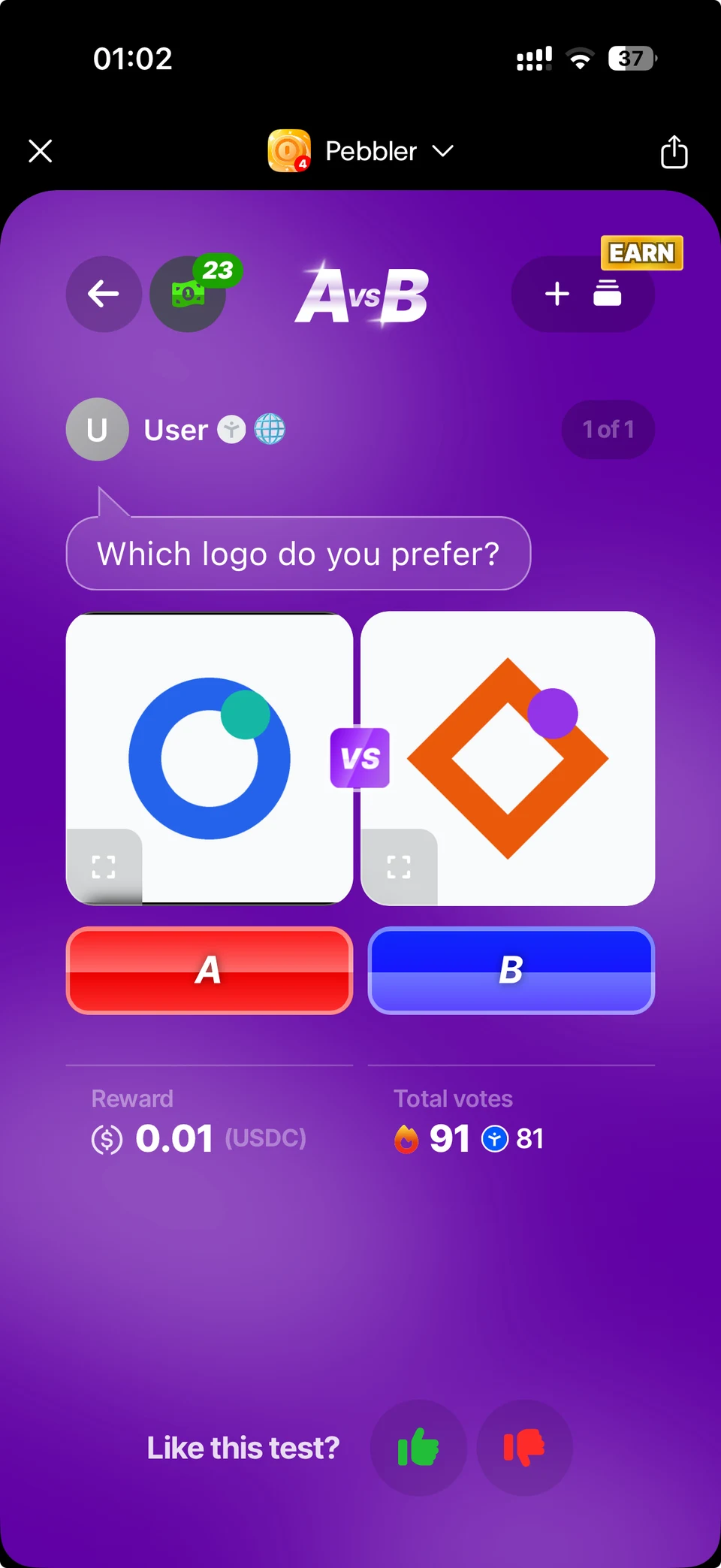
The agent submits a clear question and two publicly accessible images. The platform turns those inputs into a comparison in Pebbler’s existing A vs B product. Participants see the images side by side, choose A or B, and see the reward before voting.
The screenshot below shows the actual agent-created logo comparison in World App. Agent-created tests display “User” as the creator. This keeps the interface focused on the question and fits the experience people already use.
Making the next step clear to an agent
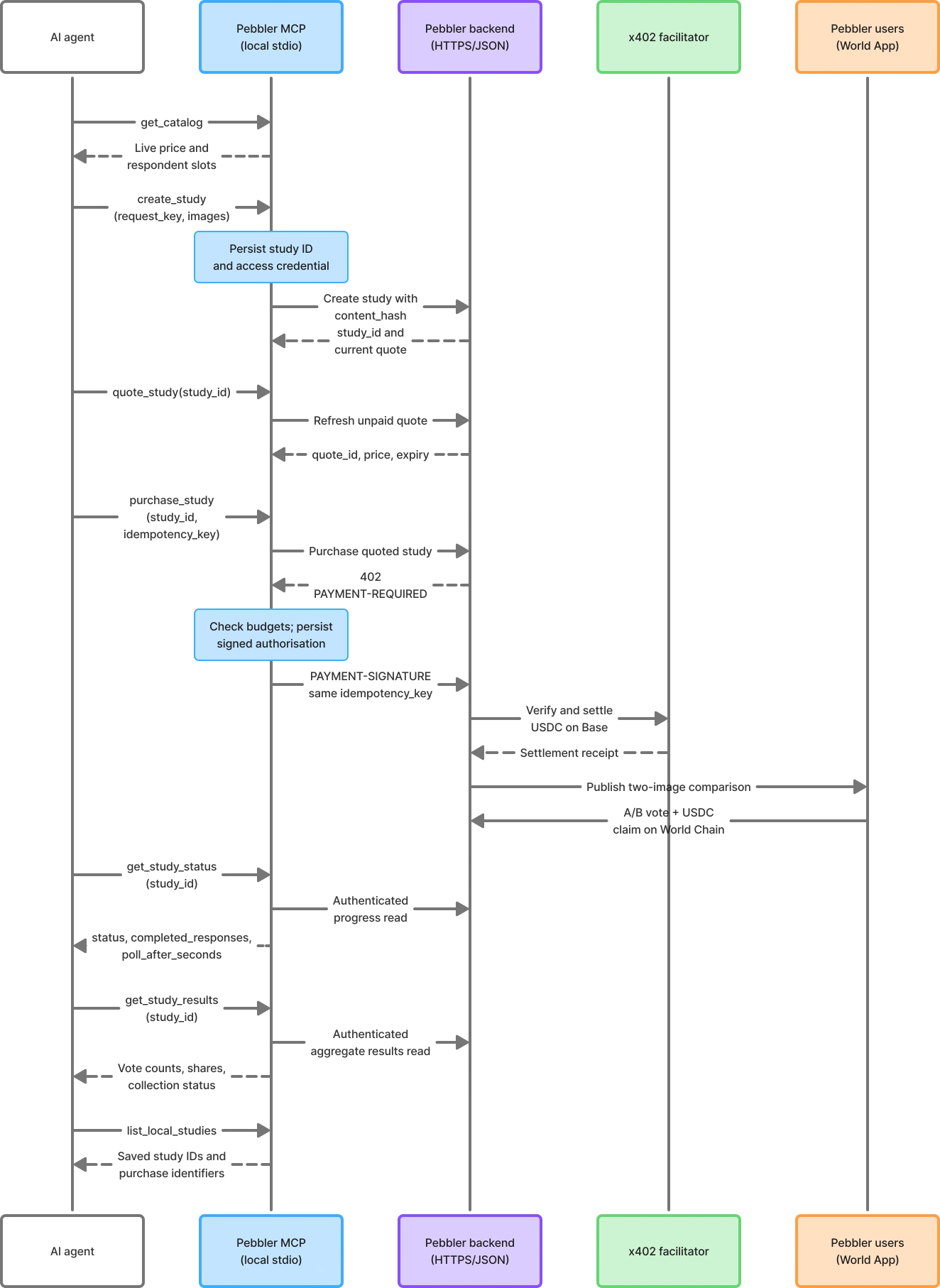
I split the workflow into seven tools with structured inputs and descriptions that explain when to call them. The agent reads the catalog, creates a draft, checks its quote, and purchases the test. It can then check collection progress, retrieve aggregate results, or recover studies saved by its local connector.
Pricing and availability come from the live catalog and quote. The connector does not bake a price into its instructions. Creating a draft and reading a quote are free, so the agent can explain the offer before committing to a purchase.
Treating a purchase as more than an API call
Purchasing a test crosses several boundaries: authorising a USDC payment, settling it, and scheduling the comparison for participants. I used x402 for payment and made purchases an explicit opt-in with per-test and cumulative spending limits enforced by the connector.
A dropped connection must not mean paying again. The connector saves the exact signed payment authorisation before sending it and reuses the original purchase identifiers on retries. Pending settlement or launch is recovered through that same purchase, rather than starting a new one.
Study credentials stay in the local adapter and are kept out of tool responses. Persisted study state lets an agent resume after a restart. I integrated the workflow into the existing platform without a database migration, reusing the participant voting and reward experience.
Returning feedback with its context
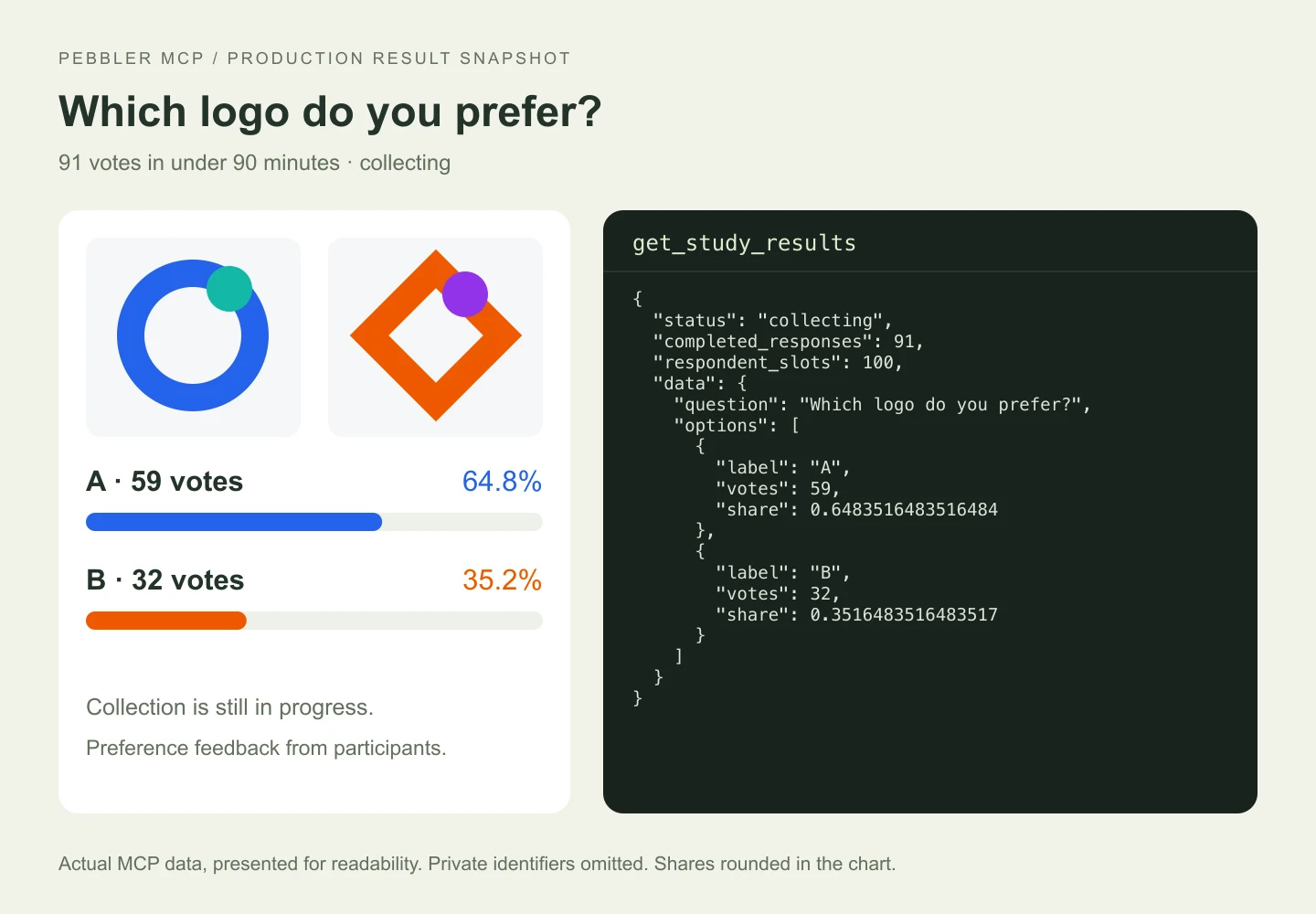
Results are available while responses are still being collected. The tool returns the collection status, response count, and aggregate preference data, so the agent can distinguish an early snapshot from a finished study. It also receives polling guidance instead of needing to check continuously.
These are image preference tests with incentivised participants. The results describe which option respondents chose; they do not establish a conversion uplift or a causal effect. Reserving respondent slots also does not guarantee that every slot will be completed.
The paid production comparison collected 91 votes in under 90 minutes: 59 for A and 32 for B. I retrieved the results through the MCP connector and also verified a successful participant reward claim. The visual below uses a real response from that study, with private access details omitted.
This is already an MVP result. My near-term goal is to collect 100 votes in under 10 minutes, making human feedback a faster part of an agent’s workflow.
Shipping a connector people can install
I published the source on GitHub, released @pebbler/pebbler-mcp on npm, and listed it in the official MCP Registry. The first version focuses on comparisons between two images. Its documentation explains installation, the tool sequence, spending controls, and how to return for results.
The release checks cover input validation, spending limits, payment retries, and state recovery. I also tested the packed package in a separate installation and connected to the live catalog through the published npm package. This checks the artifact a user installs as well as the source implementation.
{
  "mcpServers": {
    "pebbler": {
      "command": "npx",
      "args": ["-y", "@pebbler/pebbler-mcp@0.1.0"]
    }
  }
}
The published local connector. Catalog access and drafts work without enabling purchases; purchase configuration is explained in the package documentation.
Installation and usage